Tread & Tone

The Best Caregiver Pagers for the Elderly

A caregiver pager is the cheapest useful thing in this whole category — on one condition. Somebody has to be there to hear it. Everything about choosing one follows from making sure that they do.

By Stephen V.Last updated How we choose

How this is funded: we earn a commission if you buy through our links, at no extra cost to you. It never changes what we recommend, and every page here names at least one thing we would not buy. Full disclosure.

The caregiver pager to buy is the PRNBRH CF106, and the reason is one feature nobody else here publishes: a 1–6 LED number display on the receiver, so each button is identified rather than just alarming. When the bathroom button and the bedside button sound identical, whoever answers starts by guessing and walking. The CF106 also publishes a second radio channel alongside its Wi-Fi, stated to keep paging during an internet outage, and 300 ft of through-wall range. Our budget pick is the CallToU 1-button kit, which costs the least of anything here and still publishes the two specs that matter most: 500+ ft through walls, and a volume range from 0 dB up to 110 dB — the only decibel figure any alert device in our registry states.

Be clear about what this product is, because the listings are not. A caregiver pager rings a plug-in receiver inside the same house. It does not call 911, it does not reach a monitoring center, and on two of these four it does not contact anybody outside the building at all. That makes it the right purchase for one specific and very common situation — an older adult living with a spouse, an adult child, or a carer who is around but not always in the room — and the wrong purchase for somebody living alone. If that is your situation, read our Life Alert alternatives page instead: it ranks devices that place an actual call and says plainly what a no-fee device gives up.

For the household where somebody is there, a pager solves a real and underrated problem. The CDC records more than one in four adults 65 and over falling every year, and that falling once roughly doubles the chance of falling again. But the far more frequent event is not a fall at all: it is needing help getting up from the toilet, or off the floor after a slow slide, or out of a bath — at a moment when shouting does not carry through a closed door and a dressing gown has no phone in it. A button on a lanyard fixes that for the price of a takeaway.

Three criteria decide the order here, and they are all published. First, range — and whether the figure is through walls or in the open, because those are different numbers and sellers quote whichever flatters them. Second, how loud the receiver goes, which is the spec that decides whether a chime in the kitchen reaches a carer upstairs with a vacuum running. Third, whether the receiver tells you which button was pressed, which matters the moment there is more than one button in the house.

And the finding of the page is a pleasant surprise after months of writing about this industry: in this category the specs are mostly published, and the cheapest maker publishes the most. CallToU states a decibel range, a through-wall distance, and that the button andthe receiver are both waterproof and dustproof — which neither Wi-Fi pager here can claim. What nobody publishes is battery life. Not one of the four states how long the button runs before it needs a cell, which on a device whose entire job is to work on the one day you need it is the blank worth knowing about.

Live prices sit inside the buttons with the date of our last check — our most recent read was November 22, 2026. We have not used any of these devices. What we did instead is written down.

Quick picks

Ranked on the published accessibility measurements and on who each machine actually suits. Select a row to jump to the full write-up. The last column is the number of the nine measurements the manufacturer will not publish — we have not used any of these machines, and here is exactly what we did instead.

#MachineBest forSpecs withheldPrice
1
PRNBRH Wi-Fi Caregiver Pager with LED Number Display

PRNBRH Wi-Fi Caregiver Pager with LED Number Display

Knowing which button was pressed

Best overall1of 8
$35.99 · Check price on Amazon

$43.9918% off

Price as of November 22, 2026. #ad How we’re funded

2
CallToU Caregiver Pager, 2 Buttons and 2 Receivers

CallToU Caregiver Pager, 2 Buttons and 2 Receivers

Covering a whole house, not one room

Best whole-house kit1of 8
$33.59 · Check price on Amazon

$41.9920% off

Price as of November 22, 2026. #ad How we’re funded

3
TurboSense Wi-Fi Caregiver Pager with SOS Watch Button

TurboSense Wi-Fi Caregiver Pager with SOS Watch Button

The longest published range

Longest published range1of 8
$31.99 · Check price on Amazon

$39.9920% off

Price as of November 22, 2026. #ad How we’re funded

4
CallToU Caregiver Pager, 1 Button and 1 Receiver

CallToU Caregiver Pager, 1 Button and 1 Receiver

Budget pick, and the loudest published chime

Budget pick1of 8
$19.99 · Check price on Amazon

$26.9926% off

Price as of November 22, 2026. #ad How we’re funded

1.Best overall

PRNBRH Wi-Fi Caregiver Pager with LED Number Display(CF106)
PRNBRH Wi-Fi Caregiver Pager with LED Number Display
$35.99 · Check price on Amazon

$43.9918% off

Price as of November 22, 2026. #ad How we’re funded

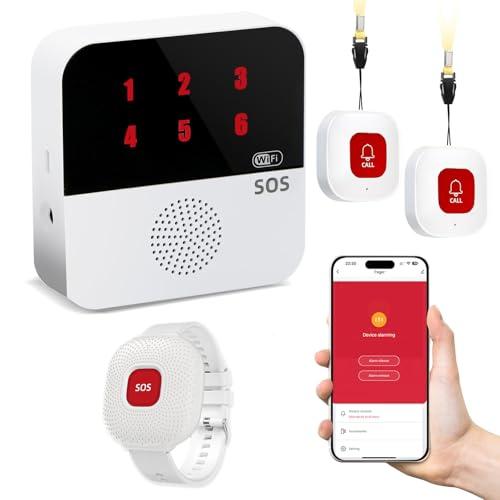
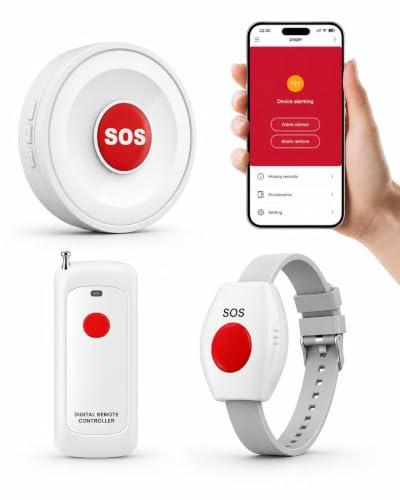
The pager to buy if more than one person, or more than one room, needs a button. Each button maps to its own number on the receiver's LED display, so whoever answers knows which button was pressed before they start walking. It also publishes a second radio channel alongside the Wi-Fi, so the receiver still chimes during an internet outage.

What it gets right

  • Published 1-6 LED number display on the receiver, so each button is identified rather than just alarming
  • Dual channel published — Wi-Fi plus a wireless RF signal, stated to keep paging during an internet outage
  • Published 300 ft through walls and doors
  • Ships with 2 call buttons, a waterproof wristband and a receiver
  • Tuya Smart / Smart Life app, published as shareable so several family members get the notification

What to know first

  • Its own listing says phone SMS notifications require a subscription — only the chime and the app push are fee-free
  • Only the hand-worn remote is waterproof, which the listing states explicitly
  • Wi-Fi is 2.4 GHz only, published
  • It is a pager: it does not call 911, a dispatcher, or any phone number
  • No published battery life and no published fall detection

Fit-to-You: the nine measurements

PRNBRH does not publish 1 of 8 of these. Where that is the case, this panel says so rather than guessing. How we compile these

What happens when it is pressedThe whole question on an alert device: when the button is pressed, what happens, and who hears it. A chime in an empty house is not a help call.
The plug-in receiver "will sound a pager alarm" and the app sends "an immediate alarm reminder" to the paired phone. No call is placed

Source: Amazon product listing data (Creators API) · read 2026-11-22

Who the alert reachesThe whole question on an alert device: when the button is pressed, what happens, and who hears it. A chime in an empty house is not a help call.
Anyone in earshot of the receiver, plus every phone the device has been shared with through Tuya Smart or Smart Life

Source: Amazon product listing data (Creators API) · read 2026-11-22

Monthly subscriptionThe monthly cost that isn't on the price tag.
None for the chime or the app push — but the listing adds "if you need additional phone SMS notifications, you must subscribe"

Source: Amazon product listing data (Creators API) · read 2026-11-22

What it needs to workWhat the device needs in order to work at all — Wi-Fi, a landline, a cellular SIM or just a wall socket. It is the spec that rules a household in or out.
A 2.4 GHz Wi-Fi network for the app, plus a mains outlet for the receiver. The RF channel is published as working without the internet

Source: Amazon product listing data (Creators API) · read 2026-11-22

Range from the receiverHow far from the receiver the button still works, and whether the figure is through walls or in the open. Those are very different numbers.
Published as penetrating walls and doors up to 300 ft

Source: Amazon product listing data (Creators API) · read 2026-11-22

Buttons included and maximumHow many buttons come in the box and how many the base will take. One button covers one room.
2 call buttons, 1 waterproof wristband and 1 receiver with a 1-6 number display. The maximum number of buttons is not published

Source: Amazon product listing data (Creators API) · read 2026-11-22

Water resistanceWhether it can be worn in the shower — where a great many falls happen.
"Only the hand-worn remote control is waterproof" — the maker's own parenthesis. The other button and the receiver are not

Source: Amazon product listing data (Creators API) · read 2026-11-22

Battery lifeHow often somebody has to remember to charge it.
Not published by the manufacturer

We have not used this machine. Everything above comes from the manufacturer’s published documentation and the dated retailer listing, with the source given for each figure. Where they don’t publish a number, we say so. We can’t tell you how it feels to ride, how quiet it really is, or how it holds up after two years — and anyone who tells you otherwise without owning one is guessing.
2.Best whole-house kit

CallToU Caregiver Pager, 2 Buttons and 2 Receivers(CC01 2-2)

CallToU Caregiver Pager, 2 Buttons and 2 Receivers
$33.59 · Check price on Amazon

$41.9920% off

Price as of November 22, 2026. #ad How we’re funded

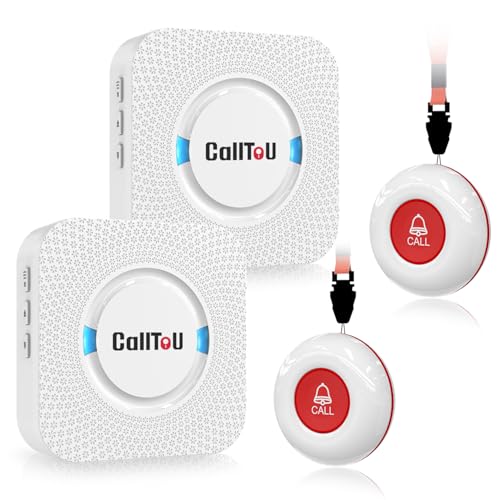
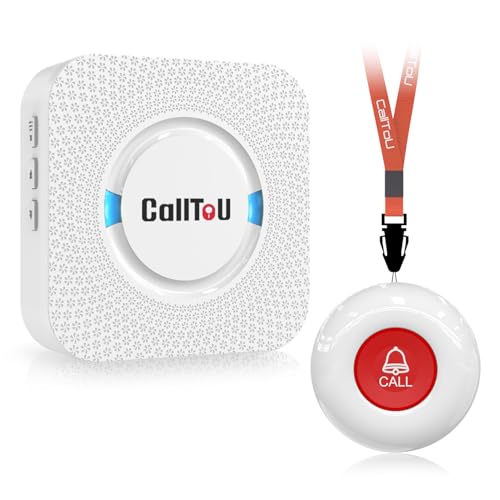
The same pager as the single kit with the problem that actually defeats these things solved: two receivers. One chime in a bedroom is inaudible from a garden or a basement, and buying coverage is cheaper than buying range. Two buttons also means the bathroom and the bedside both get one.

What it gets right

  • 2 receivers and 2 call buttons published, so two rooms can be covered at once
  • Same published 0 dB to 110 dB volume range across 5 levels, and 55 ringtones
  • Both buttons and both receivers published as waterproof and dustproof
  • Published 500+ ft through-wall range
  • Each button can be worn on a neck strap, bracketed, or stuck down

What to know first

  • Still no app and no phone notification — an empty house hears nothing
  • Both receivers need their own mains outlet
  • No LED number display, so two buttons sound identical at the receiver
  • Roughly the price of the Wi-Fi pagers here, which do send a phone notification
  • No published battery life, no fall detection, no outbound call

Fit-to-You: the nine measurements

CallToU does not publish 1 of 8 of these. Where that is the case, this panel says so rather than guessing. How we compile these

What happens when it is pressedThe whole question on an alert device: when the button is pressed, what happens, and who hears it. A chime in an empty house is not a help call.
Both plug-in receivers ring. Nothing is dialed and no app notification is published

Source: Amazon product listing data (Creators API) · read 2026-11-22

Who the alert reachesThe whole question on an alert device: when the button is pressed, what happens, and who hears it. A chime in an empty house is not a help call.
Anyone in earshot of either receiver, inside the same home. No one outside it

Source: Amazon product listing data (Creators API) · read 2026-11-22

Monthly subscriptionThe monthly cost that isn't on the price tag.
None, and none is offered

Source: Amazon product listing data (Creators API) · read 2026-11-22

What it needs to workWhat the device needs in order to work at all — Wi-Fi, a landline, a cellular SIM or just a wall socket. It is the spec that rules a household in or out.
Two mains outlets, one per receiver. No Wi-Fi, phone line or cellular service

Source: Amazon product listing data (Creators API) · read 2026-11-22

Range from the receiverHow far from the receiver the button still works, and whether the figure is through walls or in the open. Those are very different numbers.
"500+FT Through-Wall", same figure as the single-receiver kit

Source: Amazon product listing data (Creators API) · read 2026-11-22

Buttons included and maximumHow many buttons come in the box and how many the base will take. One button covers one room.
2 receivers and 2 call buttons. The maximum number of paired buttons is not published

Source: Amazon product listing data (Creators API) · read 2026-11-22

Water resistanceWhether it can be worn in the shower — where a great many falls happen.
Published as waterproof and dustproof on both call buttons and both receivers. No IP rating published

Source: Amazon product listing data (Creators API) · read 2026-11-22

Battery lifeHow often somebody has to remember to charge it.
Not published by the manufacturer

We have not used this machine. Everything above comes from the manufacturer’s published documentation and the dated retailer listing, with the source given for each figure. Where they don’t publish a number, we say so. We can’t tell you how it feels to ride, how quiet it really is, or how it holds up after two years — and anyone who tells you otherwise without owning one is guessing.
3.Longest published range

TurboSense Wi-Fi Caregiver Pager with SOS Watch Button

TurboSense Wi-Fi Caregiver Pager with SOS Watch Button
$31.99 · Check price on Amazon

$39.9920% off

Price as of November 22, 2026. #ad How we’re funded

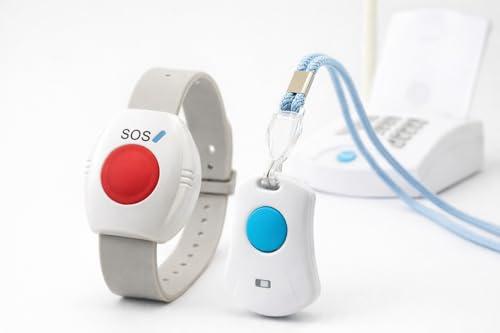
The longest published range of any pager here — 656 ft in the open on a 433 MHz signal — with both a pendant button and a wrist-worn SOS watch in the box, plus app notifications over Wi-Fi. For a house with a garden or a basement, range is the spec that decides whether the chime is heard at all.

What it gets right

  • Published 656 ft / 200 m open-area range on 433 MHz, the longest figure in this group
  • Includes 1 waterproof call button, 1 SOS watch button and 1 receiver — a pendant and a wrist option in one box
  • App push notifications over 2.4 GHz Wi-Fi, published as no monthly fee and no subscription
  • Published adjustable receiver volume levels for multi-room use
  • The listing names the rooms it is meant for — bedroom, bathroom, bedside, kitchen, living room, hallway and wheelchair use

What to know first

  • 656 ft is an OPEN-AREA figure; the listing publishes no through-wall range, unlike two others here
  • It is a pager: nothing is dialed, and no monitoring center or 911 call is published
  • No LED number display, so a multi-button household cannot tell which button was pressed
  • No published battery life, no published fall detection and no IP rating
  • No manufacturer model number published anywhere on the listing

Fit-to-You: the nine measurements

TurboSense does not publish 1 of 8 of these. Where that is the case, this panel says so rather than guessing. How we compile these

What happens when it is pressedThe whole question on an alert device: when the button is pressed, what happens, and who hears it. A chime in an empty house is not a help call.
"Press the alert button to sound the plug-in receiver and send app push notifications through 2.4GHz Wi-Fi". No call is placed

Source: Amazon product listing data (Creators API) · read 2026-11-22

Who the alert reachesThe whole question on an alert device: when the button is pressed, what happens, and who hears it. A chime in an empty house is not a help call.
A "nearby caregiver" in earshot of the receiver, plus "connected family members" on the app

Source: Amazon product listing data (Creators API) · read 2026-11-22

Monthly subscriptionThe monthly cost that isn't on the price tag.
None — "no monthly fee, no subscription", stated without qualification

Source: Amazon product listing data (Creators API) · read 2026-11-22

What it needs to workWhat the device needs in order to work at all — Wi-Fi, a landline, a cellular SIM or just a wall socket. It is the spec that rules a household in or out.
A mains outlet for the receiver; 2.4 GHz Wi-Fi for the app notifications. The button-to-receiver link is 433 MHz radio rather than Wi-Fi

Source: Amazon product listing data (Creators API) · read 2026-11-22

Range from the receiverHow far from the receiver the button still works, and whether the figure is through walls or in the open. Those are very different numbers.
"656ft/200m open-area coverage" on 433 MHz. No through-wall figure published

Source: Amazon product listing data (Creators API) · read 2026-11-22

Buttons included and maximumHow many buttons come in the box and how many the base will take. One button covers one room.
1 waterproof call button, 1 SOS watch button and 1 receiver. The maximum number of buttons is not published

Source: Amazon product listing data (Creators API) · read 2026-11-22

Water resistanceWhether it can be worn in the shower — where a great many falls happen.
The call button is published as waterproof. No IP rating, and nothing is published for the watch button or the receiver

Source: Amazon product listing data (Creators API) · read 2026-11-22

Battery lifeHow often somebody has to remember to charge it.
Not published by the manufacturer

We have not used this machine. Everything above comes from the manufacturer’s published documentation and the dated retailer listing, with the source given for each figure. Where they don’t publish a number, we say so. We can’t tell you how it feels to ride, how quiet it really is, or how it holds up after two years — and anyone who tells you otherwise without owning one is guessing.
4.Budget pick

CallToU Caregiver Pager, 1 Button and 1 Receiver(CC01US+01A)

CallToU Caregiver Pager, 1 Button and 1 Receiver
$19.99 · Check price on Amazon

$26.9926% off

Price as of November 22, 2026. #ad How we’re funded

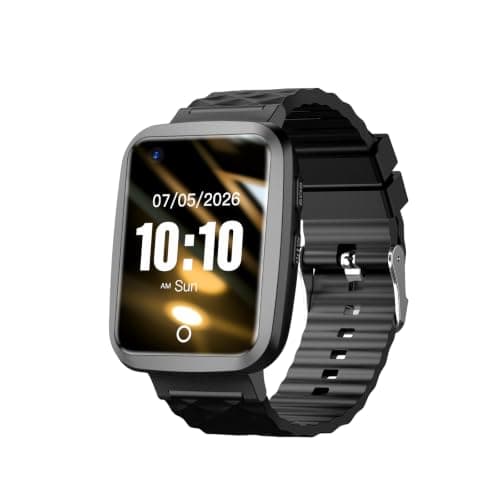
The cheapest way to put a button in a bathroom, from the one maker in this group with a real product line behind it. It publishes the two things that actually matter on a pager and that nobody else here states: a volume range up to 110 dB, and that BOTH the button and the receiver are waterproof and dustproof — not just the button.

What it gets right

  • Published 5 volume levels from 0 dB to 110 dB — the only decibel figure published by any alert device in our registry
  • Published as waterproof AND dustproof on both the call button and the receiver, which the Wi-Fi pagers here are not
  • Published 500+ ft through-wall range, so the figure is a through-wall one rather than open-air
  • The button can be worn on a neck strap, bracketed to a wall, or stuck down — three published mounting options
  • 55 selectable ringtones, so the alert does not sound like the doorbell

What to know first

  • No app and no phone notification of any kind — if nobody is in the house, pressing it achieves nothing
  • One button and one receiver only; a second room means buying the larger kit
  • The receiver must be plugged into an outlet, so it is only where there is a socket
  • No published battery life for the button
  • No fall detection, no outbound call, no monitoring service

Fit-to-You: the nine measurements

CallToU does not publish 1 of 8 of these. Where that is the case, this panel says so rather than guessing. How we compile these

What happens when it is pressedThe whole question on an alert device: when the button is pressed, what happens, and who hears it. A chime in an empty house is not a help call.
The plug-in receiver rings, at a selected tone and volume. Nothing is dialed and no app is involved

Source: Amazon product listing data (Creators API) · read 2026-11-22

Who the alert reachesThe whole question on an alert device: when the button is pressed, what happens, and who hears it. A chime in an empty house is not a help call.
Only a person in earshot of the receiver. The listing frames it as letting "caregivers and residents be free" inside one home

Source: Amazon product listing data (Creators API) · read 2026-11-22

Monthly subscriptionThe monthly cost that isn't on the price tag.
None, and no subscription is offered — there is no account or service behind it

Source: Amazon product listing data (Creators API) · read 2026-11-22

What it needs to workWhat the device needs in order to work at all — Wi-Fi, a landline, a cellular SIM or just a wall socket. It is the spec that rules a household in or out.
A mains outlet for the receiver, and nothing else. No Wi-Fi, no phone line, no cellular — published as plug in and use

Source: Amazon product listing data (Creators API) · read 2026-11-22

Range from the receiverHow far from the receiver the button still works, and whether the figure is through walls or in the open. Those are very different numbers.
"500+FT Through-Wall", with the open-area working range also given as 500+ ft

Source: Amazon product listing data (Creators API) · read 2026-11-22

Buttons included and maximumHow many buttons come in the box and how many the base will take. One button covers one room.
1 receiver and 1 call button. The maximum number of paired buttons is not published

Source: Amazon product listing data (Creators API) · read 2026-11-22

Water resistanceWhether it can be worn in the shower — where a great many falls happen.
"Both call button and receiver are waterproof and dustproof", with the washroom named explicitly. No IP rating published

Source: Amazon product listing data (Creators API) · read 2026-11-22

Battery lifeHow often somebody has to remember to charge it.
Not published by the manufacturer

We have not used this machine. Everything above comes from the manufacturer’s published documentation and the dated retailer listing, with the source given for each figure. Where they don’t publish a number, we say so. We can’t tell you how it feels to ride, how quiet it really is, or how it holds up after two years — and anyone who tells you otherwise without owning one is guessing.
What we found looking for these numbers

We went looking for 32 measurements across the 4machines on this page — the nine that decide whether an older adult can get on, reach the controls, read the screen and hear themselves think. 4 of those 32 are not published by anybody. Not one manufacturer here publishes the full set.

Step-over height is the worst of them. It is the single measurement that decides whether you can get onto a machine at all, and across everything we checked, not one manufacturer states it. That is not an oversight in a category explicitly marketed to seniors, and the count in each panel above is there so you can see who is doing it.

Where a figure exists, we cite it and date it. Where it doesn’t, the panel says Not published by the manufacturer rather than an estimate dressed up as a fact. You can measure step-over height yourself in about a minute — and if a machine is already in your house, that is the fastest way to settle it.

Range, and the difference between 500 feet and 500 feet

Every pager in this category leads with a distance, and the distances are not comparable. Read the qualifier, not the number.

The TurboSense publishes the biggest figure here — 656 ft, or 200 m — and publishes it as an open-area range. Open area means line of sight with nothing in between. It is a real measurement and it is the right one for a garden, a yard or a workshop at the end of a drive. Both CallToU kits publish 500+ ft and publish it as through-wall, which is a smaller number describing a harder test, and in a two-storey house with plaster, plumbing and a stairwell between the button and the receiver it is the figure that predicts whether this thing works. The PRNBRH publishes 300 ft and states it penetrates walls and doors.

So the ranking on range is not the ranking of the numbers. For a house, the CallToU through-wall figure is the most useful claim on this page. For a house plus a garden, the TurboSense’s open-area reach is what you want, and its radio link runs on 433 MHz rather than Wi-Fi, which is the band that carries further at low power. Both are defensible; they are answering different questions.

There is a second way to solve range and it is often the cheaper one: buy another receiver instead of more distance.The CallToU 2-button, 2-receiver kit is on this page specifically for that. One chime in a bedroom is inaudible from a basement no matter what the range claim says; two receivers on two floors is a solved problem. It publishes the same 500+ ft through-wall figure, the same 0–110 dB volume range and the same 55 selectable ringtones as its smaller sibling, with two buttons so the bathroom and the bedside both get one.

One practical caveat that applies to all four: the receiver has to be plugged into a mains outlet. That is published on every one of them and it quietly constrains where the chime can live. A hallway with no socket is not a candidate, and if the only socket is behind a sofa the volume figure stops meaning much.

Loudness, water, and the one receiver that tells you who called

CallToU is the only maker in our entire registry — across sixty-nine products — that publishes a decibel figure with a usable range attached: 5 volume levels from 0 dB to 110 dB. We have spent months on this site pointing out that walking-pad makers quote noise figures with no test method, so it is worth saying when somebody does better. A 0 dB setting is also more useful than it sounds: it means the device can be silenced at night without unplugging it, with the app-free models relying on nothing else.

The Wi-Fi pagers publish volume differently. The TurboSense states “a loud receiver and adjustable volume levels” with no figure. The PRNBRH publishes no decibel figure either. On a device bought for a hard-of-hearing household this is a real gap, and it is the single best argument for the CallToU kits over the Wi-Fi ones.

Water resistance splits the same way, and it matters more here than almost anywhere. The bathroom is where this button earns its keep. CallToU publishes that both the call button and the receiver are waterproof and dustproof, naming the washroom explicitly. The TurboSense publishes one waterproof call button. The PRNBRH is the most honest and the most limited: its own listing says “only the hand-worn remote control is waterproof”, which means the pendant button on the same device is not. None of the four publishes an IP rating, so “waterproof” is a word rather than a standard on every one of them.

Which brings us to why the PRNBRH leads anyway. It is the only receiver here that identifies the caller: each button maps to its own number on a 1–6 LED display. In a single-button house that is worth nothing. In a house with a bathroom button, a bedside button and a chair button — which is what most people end up with within a month — it is the difference between walking straight to the right room and checking three. It also publishes a dual-channel design, Wi-Fi plus a wireless RF signal, stated to keep the receiver chiming during an internet outage, and app notifications that can be shared with several family members through Tuya Smart or Smart Life.

Its honest cost is in its own small print, and we would rather quote it than summarize it: the chime and the app push are fee-free, but “if you need additional phone SMS notifications, you must subscribe”. If a text message is part of your plan, that is a subscription on a product sold as having none. The TurboSense, by contrast, states “no monthly fee, no subscription” flat, and the CallToU kits have no account behind them at all.

What no pager does, the battery blank, and what we would buy

Three things to be straight about before you spend anything.

No pager detects a fall.Several of these listings carry the words “fall alert” in the title and then describe a button in the features. Somebody has to press it, consciously, with a hand that can reach it. If the fall you are worried about is the one that knocks somebody out, a pager is not the product and no amount of range fixes that — the devices that publish automatic detection are on our fall detection watch page and in the monitored picks on our Life Alert alternatives page, and all of them cost more.

Nobody publishes battery life. Four devices, four blanks. The button is a small sealed thing on a lanyard and not one maker states how long it runs, whether the cell is replaceable, or whether the receiver warns you when it is low. On a device that spends months doing nothing and then has to work once, that is the specification we would most like to see and the one none of them offers. The practical workaround is unglamorous: press the button once a week on purpose, and treat it like a smoke alarm.

And a pager is not a reason to skip the hardware.The National Institute on Aging puts strength and balance work alongside home modification as what actually reduces fall risk, and the CDC’s STEADI framing is screen, assess, intervene. A button summons help after the event. A rail changes whether there is an event. Our grab bar shortlist ranks five bars against the published ADA figures, and fifty dollars of fall-prevention equipment buys a bar and something to train balance on together — which, for about the price of the pager you are reading about, is the better second purchase.

So, what we would buy. For most households, the PRNBRH CF106: the LED number display is the feature you will be glad of by the second button, and the dual channel means an internet outage does not silence the house. If the problem is a chime that cannot be heard across two floors, buy the CallToU 2-button, 2-receiver kitand put a receiver on each one — coverage beats range, and it publishes the loudest figure on the page. If there is a garden, a workshop or a long drive involved, the TurboSense publishes the reach for it, with an SOS watch button and a pendant in the same box and an unqualified no-subscription promise. And if the budget is genuinely the constraint, the CallToU 1-button kitis the cheapest thing on this site that makes a measurable difference to somebody’s day, with both halves published waterproof and a volume figure nobody else will state.

If you are buying this for a parent and wondering what else is worth the money, our guide to equipment for aging parents covers the same decision across the rest of the house.

General information, not medical advice. Tread & Tone is written by an enthusiast, not a clinician. Nobody here is a doctor, a physical therapist or a trainer, and nothing on this site has been medically reviewed. Talk to your doctor or physical therapist before starting something new, particularly after surgery, a fall, or a change in medication.

Questions people ask

What is the best caregiver pager for the elderly?

The PRNBRH CF106, because it is the only receiver in our registry that identifies which button was pressed — a 1 to 6 LED number display — which matters as soon as a household has more than one button. It also publishes a dual-channel design, Wi-Fi plus a wireless RF signal, stated to keep paging during an internet outage, 300 ft of through-wall range, and app notifications shareable with several family members. Its published limits: only the hand-worn remote is waterproof, and its own listing says phone SMS notifications require a subscription.

How far do caregiver pagers reach?

It depends entirely on whether the maker is quoting an open-area or a through-wall figure, and they rarely say which in the headline. The TurboSense publishes the longest distance here, 656 ft / 200 m, explicitly as open-area. Both CallToU kits publish 500+ ft as through-wall, which is a smaller number from a harder test and the better predictor inside a two-storey house. The PRNBRH publishes 300 ft and states it penetrates walls and doors. For a house, read the through-wall figure; for a garden or a long drive, the open-area one.

Will a caregiver pager work if the person lives alone?

No, and this is the most important thing on the page. A pager rings a plug-in receiver inside the same house — on the Wi-Fi models it also pushes a notification to a paired phone, which may reach a family member elsewhere if they see it, but nothing is dialed and no service is contacted. For somebody living alone, the device you want places a call: our Life Alert alternatives page ranks those, including one no-monthly-fee unit that dials up to three phone numbers in sequence and plays a recorded message.

Do caregiver pagers have a monthly fee?

Mostly no, but check the wording because the three answers differ. The CallToU kits have no account or service behind them at all. The TurboSense states 'no monthly fee, no subscription' without qualification. The PRNBRH states that the chime and the app push are fee-free but adds, in its own listing, 'if you need additional phone SMS notifications, you must subscribe' — so if a text message is part of your plan, that is a subscription on a product sold as having none.

How loud is a caregiver pager?

Only one maker in our registry will tell you. CallToU publishes 5 volume levels from 0 dB to 110 dB on both its kits, which is the only decibel figure any alert device here states — and the 0 dB setting is genuinely useful, since it means the receiver can be silenced overnight without unplugging it. The Wi-Fi pagers describe a 'loud receiver' with adjustable levels and publish no figure. For a hard-of-hearing household that gap is the strongest argument for the CallToU kits.

Are caregiver pagers waterproof enough for the bathroom?

That is where they earn their keep, so read the detail. CallToU publishes that both the call button and the receiver are waterproof and dustproof, naming the washroom explicitly. The TurboSense publishes one waterproof call button. The PRNBRH is the most candid and the most limited — its own listing says only the hand-worn remote control is waterproof, so the pendant button on the same device is not. None of the four publishes an IP rating, so 'waterproof' is a word rather than a standard on every one of them.

How long does the button battery last?

Not one of the four publishes it, which is the clearest blank in this category. No maker states the battery life, whether the cell is user-replaceable, or whether the receiver warns you when it is low — on a device that sits unused for months and then has to work once. Until somebody publishes a figure, treat it like a smoke alarm: press the button once a week on purpose, and confirm the receiver still sounds.

Sources

Product measurements are cited individually inside each Fit-to-You panel, against the manufacturer page or dated retailer listing they were read from.

Read next